Quantcast
Channel: Hacker 10 – Security Hacker
Viewing all 193 articles
Browse latest View live

Android and iPhone Radio Police Scanner

$
0
0

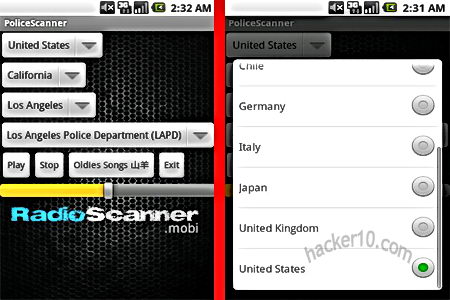
Radio Police Scanner Lite is a free app preconfigured with a list of emergency services radio frequencies, it can listen in to firefighters, ham radio, aircraft and live police radio, each feed comes from a person owning a police scanner in that geographical zone and sharing it via the Internet. Stations are classified by region and country with a built-in emergency services code to interpret what they are talking about, you can add any radio frequency broadcasted over the web in the RSS feeds link, it will automatically reconnect to the feed if it loses connection, favourites can be pinned to the front screen and accessible with a single tap.

There is only a delay of a couple of seconds in between the real talking and the broadcasting, you can browse the Internet while listening to a feed in the background, the only thing not guaranteed is that your country will be covered but the app is continuously expanding radio feeds, the paid for version of this app comes with thousands more of radio frequencies.

Radio Police Scanner smartphone

Radio Police Scanner smartphone

Many of the radio frequencies will be silent, the best way to spot what are the most active channels is by looking at the popularity of each feed, the more listeners the more likely it is that there is something going on or talking.

Investigation departments use encrypted radios to communicate during surveillance operations you won’t be able to listen to those, the radio will broadcast a routine police or firefighters working day. Police radio scanners are legal in many US states but is best that you check your local laws before using it as there are some restrictions like for example using a police scanner to impersonate a police officer, alternatively you can also listen to live emergency services online via your browser at Broadcastify.

Visit Radio Police Scanner Lite in GooglePlay

Visit Radio Police Scanner Lite in iTunes


Internet Relay Chat encryption with Dirt

$
0
0

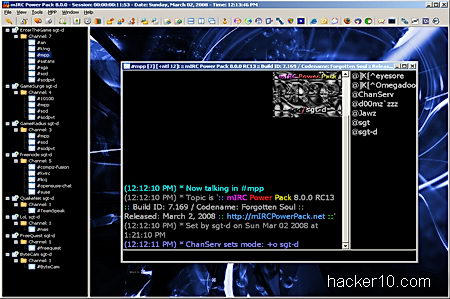
Dirt is an open source project adding FiSH compatible chat encryption to any IRC client, it can be used as Socks4 proxy or bouncer. Dirt only allows localhost (127.0.0.1) connections, this is to make sure that encrypted text will not leak out of your machine, the listening port for Socks4 is 1088 and the 6666 port is used when acting as a bouncer, settings can be changed modifying “dirt.ini” with a text editor.

After installation you will notice a Dirt icon in your system tray, to use Dirt in mIRC, a popular Windows IRC chat client, you need to access Tools>Options>Connect>Firewall and enter the appropriate hostname (127.0.0.1) and port number. Once connected you can type /dirt to see a list of all possible commands,

mIRC dirt encryption IRC chat

mIRC dirt encryption IRC chat

For those not aware, FiSH is a widely available IRC plugin providing Blowfish encryption grade to IRC chat, you can find it in the Linux command line irssi IRC client and many others. If you use a Mac computer or Debian Linux you could try FiSHLiM, a plugin for FiSH IRC encryption working in XChat and HexChat IRC chat clients.

Dirt works in Windows, Linux and BSD but it is still in development, another alternative could be using psyBNC, an IRC bouncer that replaces your computer IP with a virtual host (vHost) and supports channel encryption with Blowfish and IDEA algorithm, you will need a shell account to manage psyBNC, there are many companies offering them at cut-prize with easy configuration instructions, they are normally used by channel administrators to handle abuse.

Visit Dirt IRC encryption homepage

Encrypted chat for iPhone and iPad with ChatSecure

$
0
0

ChatSecure is a free iOS app for end to end encrypted chat with the Off The Record messaging system able to communicate with any chat software based on XMPP, like Google Talk, Jabber, Facebook, Oscar IM and Gibberbot in Android, it will not work with Yahoo Messenger or Skype contacts.

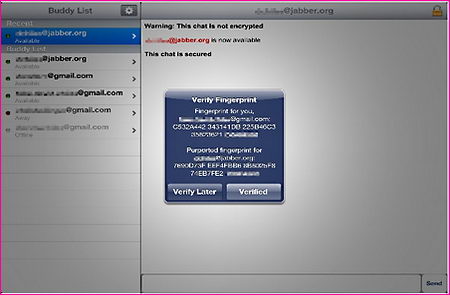
The app settings are simple but effective, you can change chat font size, set to autodelete chats on disconnect and get a warning before automatic sign out, your friends (Buddy list) chat accounts are accessible with a single tab on the side bar, each account has a logo indicating the messaging system your they are using, when you first establish a connection you will be shown the encryption key fingerprint and ask to verify it, this stops man in the middle attacks where someone injects a fake encryption key in between you and the other end to be able to listen in.

ChatSecure encrypted iPad chat

ChatSecure encrypted iPad chat

With this app there is no central server to store or monitor your data and third party eavesdropping is not possible because ChatSecure encrypts communications but you would still need to make sure that your acquaintance mobile device has not been stolen and he is who he claims to be, you also need to be aware that you are not anonymous in ChatSecure, the app will encrypt messaging but not hide the IP behind them, for anonymity add a VPN provider before starting the chat.

ChatSecure offers perfect forward secrecy, this means that temporary private encryption keys are generated for each session so if you lose them the keys can not be used to decrypt past chat logs or linked to you.

Visit ChatSecure iTunes homepage

Moscrack wireless WPA cracking with cluster computers

$
0
0

The Multifarious On-demand Systems Cracker is a Perl application based on Aircrack-NG to crack wireless WPA keys using cluster computers, it can be deployed in Mosix, an operating system distributed across multiple Linux machines taking advantage of conglomerated computer processors or run in collective SSH nodes, clusters can be build up with any Unix operating system, including the iPhone, MacOSX, or Windows and Cygwin, it has also been tested on an Android phone running as a SSH node, best of all you can run Moscrack on the cheap from the Amazon EC2 cloud computing platform.

The program splits a word list into chunks and processes them in parallel in between all of the nodes. If you don’t have access to a computer cluster it is possible to use Moscrack with CUDA,  an NVIDIA parallel computing platform implemented in graphics cards, you will need to install  aircrack-ng-cuda and adjust moscrack.conf (configuration file).

Moscrack cloud wireless WPA cracking

Moscrack cloud wireless WPA cracking

Moscrack command line interface shows a word list progress expressed in percentage, estimated completion time, running time, server status, cluster speed and other very complete verbose data, GUI interface is optional, it will be more suitable that you run the command line version to feel comfortable from the shell helping you to understand how concepts work, the GUI is pretty basic.

The program has been designed to run for weeks or months, you can leave it on and forget about the program until the job is done, functions go beyond WPA cracking, adding the Dehasher plugin will compare SHA256/512, DES, MD5 and Blowfish hashes to crack them, if you don’t wish to install this tool in your computer, a Moscrack Live CD running Suse Linux is available for download.

Visit Moscrack homepage

Portable hardware VPN device Färist Micro

$
0
0

Färist Micro from Swedish company Tutus is a tiny VPN device that fits in the palm of your hand and sits in between your computer and Internet connection. The A100 model has a shock resistant case made of aluminium and carbon fibre, with two Ethernet RJ45 ports, the standard port for a wired Internet connection, Färist Micro can be powered with an USB cable or via a separate power supply, both included, the A200 model is slightly bigger but it has better performance and status LED indicators showing VPN activity, the product security core is based on other evaluated Färist products and compatible with their suite of network security solutions, like a firewall.

The user interface has basic administrative functions accessible via web browser, with this tiny portable VPN device company employees can safely communicate over untrusted networks in hotels and airport Wifi access points, of course for real security a company fully encrypted laptop would have to be used at all times, using a portable VPN like Färist Micro on someone’s else computer would nullify all security since it won’t protect you against key-loggers and malware.

Portable VPN Färist Micro

Portable VPN Färist Micro

Once Färist Micro has been configured it requires no interaction from the end user, plugging it in will secure all communications routing traffic over the company VPN, this portable VPN has been jointly developed by Tutus, the Swedish Armed Forces and Swedish Defence Administration, it has been approved by the European Union to protect classified EU information up to the EU Restricted level, Tutus products are also sold under other brands like SecuriGateway, with the same specs, it only changes the brand name.

The VPN case looks extremely resistant, I wish there was something like this for home users configurable with a consumer grade VPN like IPVanish, Färist Micro is targeted at companies and government agencies, I don’t know how easy it would be to buy a single unit through a reseller, the ones I visited do not list price and ask interested parts to contact them instead.

Visit Färist Micro homepage

Intercept communications with data tampering tool HookME

$
0
0

HookME is a free open source Windows tool to intercept network communications hooking up desired processes and API calls, including SSL clear data, the unencrypted SSL headers.

The software download is initially tiny (125Kb), when you try to install it you will get a message saying it requires supplemental .dll and .db files to work, over 30MB of files will be automatically downloaded by HookME from a third party site, you will also be asked to register the new .dll dependencies giving administrative rights to Windows Command Processor, the installation process could make some people feel uneasy about this tool containing malware, the only guarantee you have is that HookME is developed by well known OSINT FOCA creators.

Every time you start the software you will be shown a small Netkra Deviare unregistered license splash screen, you don’t have to buy a license but it will get rid of the initial screen if you do.

TCP data tampering tool HookME

TCP data tampering tool HookME

The software has a tabbed user interface that can be used to intercept any hooked API call and read the data that is being sent and received, you can change intercepted packets in real time, dropping or forwarding them, a Python plugin system allows for anyone to create their own custom addon, there are some templates for that. HookME developer showed in BlackHat Europe 2013 conference how to easily intercept MySQL data and inject a backdoor on the fly with a few clicks executing remote commands.

Real time intercepted data can be seen in the user interface Hex editor showing you hexadecimal numbers and their corresponding text meaning, you can highlight data packets and click on the “Drop” or “Forward” buttons, a small window below the program lets you know what process is hooked, for example it will show firefox.exe if you are eavesdropping on a Firefox browser session.

This tool can be used for penetration testing creating malware and backdoors in network protocols or to uncover rootkits hooking up API calls, the main challenge for an attacker to use HookME against you would be getting access to your network first.

Visit HookME homepage

Penetrate Voice over IP servers with Viproy

$
0
0

Viproy is a tool for testing SIP servers security, the Session Initiation Protocol is widely used for voice and video calls over IP, the software comes with different modules performing specific tasks, all of the modules support debugging and verbose mode, this is a Linux only command line tool, instructions are included and it should not be difficult for a Linux beginner to understand them.

Software modules consist of options, register, invite, enumerator, brute force, trust analyzer and SIP proxy, you can set target networks and port numbers. Before carrying out any attack you should fingerprint and enumerate SIP services first, after that you should register with the server and start intercepting, making calls or create havoc at will.

Viproy VoIP penetration tests include targeting a local client address and port, discovering SIP services with valid credentials, setting username and password in Asterisk PBX, issuing direct invites and spoofing without credentials, enumerating all users, launching a denial of service to all valid users so that nobody can accept calls and brute forcing a target account or numeric range using a dictionary list to test users password strength.

Viproy VoIP penetration testing and hacking tool

Viproy VoIP penetration testing and hacking tool

Viproy homepage lists a vulnerable VoIP server where you can evaluate your hacking skills without harming anybody, in a real life scenario after successful hacking a VoIP server you can listen in or record inbound and outbound calls as well as setting up usernames and passwords, the damage that can be done will depend no how many vulnerabilities exist, not all of the modules will be necessary successful penetrating the server.

Another tool you might want to add to your VoIP hacking arsenal is SIPVicious suite you can use it to audit VoIP systems scanning SIP devices IP range and cracking SIP PBX. VPN services protect VoIP calls in transit but the first and last point remain vulnerable, it is possible to listen in to a VoIP encrypted call by hacking into a server before encryption takes place or when the call is decrypted at the end of the line.

Visit Viproy homepage

CIA instructions for secure email communications leaked

$
0
0

After the recent arrest of CIA agent Ryan Fogle by the Russian counter intelligence agency Federal Security Service one of items they found in his possession and leaked to the press was a letter advising his Russian informer how to conduct secure email communications, this post will scrutinize these instructions to learn why the CIA adopted those particular security measures.

  • CIA Tip 1: “To get back to use please use an Internet cafe that has Wi-fi”

The Central Intelligence Agency is advising Wi-Fi to make sure that their informer does not use someone’s else computer, when you use a public computer you agree to being monitored by the system administrator, it is impossible to known what kind of surveillance or viruses exist in that computer and any data left behind, like visited and written emails are recoverable from the Internet browser cache even after years.

They are also making sure that if the informer home Internet connection is under surveillance by his ISP and checked by keywords, it will not be a threat.

  • CIA Tip 2: “Open a Gmail account which you will use exclusively to contact us” ; “As you register do not provide any personal info”

They get their informer to use an American email company that can be easily accessible by the US government if needed, they make sure that he is not stupid enough to open the email account using his real name or address or other small details that could be linked to him like his phone number or a real password recovery email address belonging to him.

CIA secure email instructions for spies

CIA secure email instructions for spies

As a side note, there must be something good about Gmail security because former CIA Director General David Petraeus also decided to use a Gmail account for cheating on his wife last year, something I can think of is that Gmail login is with SSL and username and password can not be captured over insecure Wifi.

  • CIA Tip 3: Once you register send a message to unbacggdA@gmail.com: “In exactly one week, check this mailbox for a response from us

The CIA gets his informer to email to another Gmail address from the same company, with this they make sure that email content will not have to travel over the Internet from one provider to another, if you send an email from Gmail to Gmail, presumably data never leaves Gmail servers.

The confusing email address the CIA is using makes it very difficult for a similar one to exist, so even if their informer makes a typo, the email will not be sent to someone else by mistake, it should bounce to his inbox instead.

  • CIA Tip 4: “If you use a Netbook or any other device (i.e. tablet) to open the account at a coffee shop please don’t use a device with personal data on it”

The CIA wants to avoid cross contamination, if the tablet is lost, stolen or hacked and accessed without permission, a third party could link the email exchange with the informer’s real job exposing him as an American spy.

  • CIA Tip 5: “If possible buy a new device (paying in cash) which you will use to contact us”

The best way to avoid mixing real life data with underground activities is using a dedicated device for illegal actions that will not be touched by anything else, this greatly reduces chances of a mistake and the device can be quickly disposed of if needed. The CIA also makes sure that the informer’s credit card can not be linked to the purchase of a new tablet, if the informer is investigated someone could notice in the financial transactions that he has spent money buying a new tablet nowhere to be found.

Other spy items

Other seized items showed to the press include a couple of wigs, three pair of sunglasses and a baseball cap, all of those items make facial recognition difficult if the Russians have that kind of software installed in their CCTV network (public transportation, street cameras, etc) to automatically flag people of interest. The British government has trialled facial recognition software on CCTV street cameras and Germany is known to employ it in Frankfurt international airport.

Another interesting item found in his possession was an RFID shield that prevents reading of RFID chips embedded in passports and ID cards, this indicates that the CIA does not trust those chips otherwise there would be no need to protect them from unauthorized reading.

CIA money bundle 500 Euro bank notes

CIA money bundle 500 Euro bank notes

Allegedly the CIA spy was also carrying a large bundle of €500 Euro bank notes, these are ideal for money smuggling and corruption. China for example limits its bank notes value to small amounts to make bribery more difficult, to carry a very large amount of money in Yuan would have required the CIA agent a box full of bank notes instead of a bundle, this could explain why the CIA wanted to pay the informer’s bribe in Euros and not dollars or Russian roubles.

Computer savvy people will wonder why encryption and proxies are not mentioned at all, I am guessing here that the CIA instructions are addressed to someone who is a total computer knob and even an old grandma could follow.

More information about the arrest on CBSNews Ryan Fogle arrest


Anonymously submit documents to the press with StrongBox

$
0
0

Strongbox is a The New Yorker magazine tool to anonymously submit files and messages to journalist using the tor network, the project was put together by political activist Aaron Swartz, who died a few months ago, and Kevin Poulsen. StrongBox code is called DeadDrop and eventually will be released as open source for news agencies and particulars to implement as they wish.

DeadDrop software runs on a hardened Ubuntu environment, it includes set up instructions and scripts, the code is written in Python, accepting document submissions and encrypting them with GPG for storage it then creates a random codename to be able to get back to the submitter anonymously without using email, there are three servers to anonymize the submission process one of them is public containing the interface,  another server stores the encrypted messages and the third server monitors the other two for security breaches.

StrongBox anonymous document leak DeadDrop

StrongBox anonymous document leak DeadDropWiki

The New Yorker public server is also using a plugged in USB dongle to strenghen encryption entropy helping create a pool of random numbers, their journalists use a VPN to download the encrypted data on to a USB thumbdrive, the information is decrypted using a laptop that has no Internet access, to avoid malware infection, and running a live CD to keep temporary files out of the computer hard drive and make data recovery impossible, GPG private decryption keys are contained in a different USB thumbdrive also plugged in the same laptop prior to viewing the documents.

It is a smart set up that makes it impossible for a New Yorker journalist to learn the submitter computer IP so they can not be compelled to reveal something they don’t know. The only missing thing is a metadata scrubber, if the documents you are passing on contain metadata, and most government and company files do, the original leak source could be found out, you should use BatchPurifier first to get rid of hidden data before submitting any file.

Visit StrongBox homepage

The Active Defense Harbinger Distribution

$
0
0

The Active Defense Harbinger Distribution is a security Linux distribution based on Ubuntu 12.04 Long Term Support, Ubuntu LTS has 5 years support from Ubuntu developers Canonical, it is useful for enterprises and those who don’t need to run cutting edge software and are more interested in an stable operating system that will be supported for a long time without the need to constantly upgrade to another version to patch up security holes.

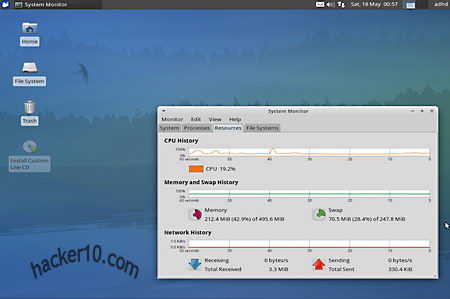
ADHD announces itself as an active defence distribution with preconfigured strike back tools, able to interfere with an attacker’s system fingerprinting, the first reconnaissance stage previous to a hacking attack. Just like Ubuntu, you can run ADHD as a live DVD or install it in your computer, when you first boot you will be given the choice of logging in as adhd user or guest user, the login password is adhd. The default window manager is the lightweight XFCE, you could change it using Synaptic package manager, a package management tool for Debian that can be used to install, remove and upgrade software packages.

The Active Defense Harbinger Distribution (ADHD)

The Active Defense Harbinger Distribution (ADHD)

On the surface you will not appreciate too many differences in between The Active Defense Harbinger Distribution and any other end user Linux distribution, it comes with The Gimp and gThumb for image editing, the full LibreOffice suite to work with documents, Thunderbird and Firefox, Catfish to search documents, basic network tools to ping, traceroute, port scan, finger and whois computer IPs, Xchat for IRC, Zenmap scanner, Gigolo, a front end to connect to remote file system, Parole Media player to watch videos, gmusic browser and Gwibber, an open source microblogging tool with access to the most popular social networking services like Twitter and Flickr. The most geeky tool included in ADHD is pgAdmin to edit PostgreSQL databases you will not find any hacking or penetration testing software on the list.

The Active Defense Harbinger Distribution protects you deploying honeypots that waste an attacker’s time, alert the administrator of the attack while still harmless and gathers information on the sources of the attack.

One of ADHD main defences is The Network Obfuscation and Virtualized Anti-Reconnaissance (Nova), it doesn’t use signature based detection for malware, instead it creates decoy systems for an attacker to interact with and alert the system administrator via email or logs that someone is attacking a dummy folder, port, etc. You can have infinite recursive directories so the attacker never really gets to his target or you can instruct Nova to automatically shut down a port when someone touches it.

The Active Defense Harbinger Distribution system monitor

The Active Defense Harbinger Distribution system monitor

ADHD also comes with Honeybadger, able to create a webpage that looks like a Cisco administration interface or something interesting for an attacker to access, the dummy page can run a Java app on the attacker’s machine, gather his IP address and add it to a report page with Google API showing approximate information about an attacker’s computer IP location in the world.

The best thing of The Active Defense Harbinger Distribution is that you should not notice it is there until something happens, on the minus side there are no offensive tools other than gathering attacker’s information but you could add more aggressive digital tools with the package manager.

Visit ADHD homepage

AttackVector Linux for penetration testing using Tor

$
0
0

AttackVector Linux is a Debian based distribution combining elements from Kali, a Linux operating system for penetration testing, and Tails, a Linux distribution for anonymous Internet communications that routes all traffic to the Tor proxy network, AttackVector aims to anonymize attacks just like malicious hackers do in real life incursions, it has been build from scratch using Debian Live-build, a tool to create custom Debian Live systems, using Kali as base and adding the Tor project to the distribution to anonymize attack sources.

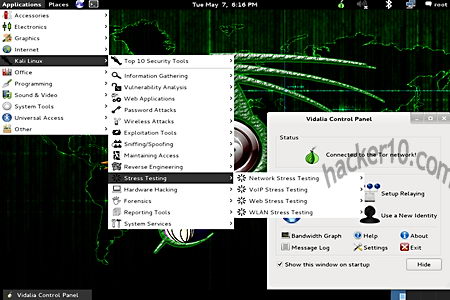
In AttackVector you will find the same hacking tools that come with Kali (from BackTrack developers), the drop menu even says “Kali Linux” before expanding to specific spoofing, exploit attacks, vulnerability analysis, hardware hacking and information gathering tools. You can see Vidalia control panel at the bottom of the screen informing you that you are connected to Tor and allowing you to change exit Tor node if needed.

AttackVector Linux Tor proxy network

AttackVector Linux Tor proxy network

This Linux distribution will not leave any trace on the computer when operated as a live DVD, installation is optional. It might be considered a black hat hacking tool, it could do lots of damage with no way to trace back malicious hackers, the only possible protection I can envision from a tool like this is for a system administrator to ban all tor exit nodes from accessing the network, but it is not easy to keep an updated list.

There is no documentation yet, it is on the todo list together with full disk encryption with LUKS and HTTPS everywhere. I didn’t think this is a novelty product, you could use Liberté Linux and add hacking tools to accomplish the same result or install Tor and hacking tools in Windows plus Truecrypt, but the most valuable penetration testing tools are only found in Linux and this is the operating system a real hacker should engage with since most servers are Linux based too.

Note: Distribution is an alpha version in early development.

Visit AttackVector Linux homepage

Get paid for ethical hacking at HackaServer

$
0
0

HackaServer is a security testing platform where companies can send their applications and apps for skilled hackers to find bugs and exploits, when a server vulnerability is found the hacker gets paid a reward. Big companies like Google and Facebook have their own security team to test code and online applications before they are released to the public, small companies can not afford the thousands of dollars that this costs, HackaServer crowd sources hundreds of hackers looking at code vulnerabilities and misconfiguration testing security and only paying if something is found, with a confidentiality clause protecting the company reputation and real production infrastructure.

Any system administrator can deploy a custom testing server with the most popular operating systems hosting apps in just a few minutes, before you start hacking a virtual server there is a sandbox called “Training Arena” where people can get a feel of the platform and test their pen testing skills.

HackaServer account creation

HackaServer account creation

There are two kind of hacking challenges, one called “Capture the Flag” where the hacker has to penetrate the server and capture all the details as evidence that he was inside, and another challenge where the hacker finds a flaw or vulnerability rating it as critical, medium or low and getting paid by the company for a full report with all the details. The report is the most important part and it will have to comply with standard penetration test reports, HackaServer only grants hacking rights to the “Playground Arena” after you have passed an IT test showing skills equivalent to a Certified Expert Penetration Tester (CEPT) exam but without being charged for it.

A good way for penetration testing students to improve their skills on HackaServer and increase their income while learning as well as way for black hat hackers to make some money the legal way.

Visit HackaServer homepage

Review offshore no logs VPN provider EarthVPN

$
0
0

EarthVPN is a new VPN company with headquarters in the Turkish Republic of Northern Cyprus, a self-declared state recognised only by Turkey, while southern Cyprus is part of the European Union the northern part is not, so they don’t have to comply with EU laws.

I have been using their VPN services for a month and prices are highly competitive, my past experience with very cheap VPN providers is that server speed tends to choke but this was not the case with EarthVPN, I don’t know if it is because they don’t have too many customers yet or because they don’t oversell their services and still make a living charging under $5 monthly fees.

There is an impressive wide range of servers in over thirty countries, including unusual VPN locations like New Zealand, South Africa and Brazil on top of the more often found German, USA and UK servers. You can have up to three devices connected at the same time but only if they share the same router, there are no bandwidth limits and mobile devices are supported as well as Windows, Mac and Linux. I contacted their support team four times and they always got back to me within a day. You can use the VPN for P2P and torrents only in the designated servers in countries with flexible copyright laws where DMCA does not apply.

EarthVPN SSTP/L2TP client software

EarthVPN SSTP/L2TP client software

A couple of their US servers in Miami were blocked by Hulu and flagged as no in the USA, this should not a problem, with all of the different US locations available I simply switched to Kansas and streamed online US TV from Europe. I carried out a DNS leak test and it showed me that EarthVPN is using Google public DNS, SMTP port 25 is blocked to stop spammers abusing the service but you can send email with SMTP SSL ports 465/587 and it will work.

Unlike other companies, EarthVPN has a clear and non hiden in small letter logging policy, this is one of their strengths, the company claims that no logs are kept but I wanted to know the specifics and I contacted their support team to make sure that I understood how the logging system works, I was told that it is impossible for EarthVPN to link any VPN IP to an account holder because DHCP requests (the Dynamic Host Configuration Protocol used to assign IPs inside a network) are not logged, EarthVPN keeps Radius (Remote Authentication) logs for a day to troubleshoot problems and they have set up a cron job to run daily (cron is a Linux command to automate jobs) erasing connection logs every day at midnight on all servers, server time is synchronized with NTP (Network Time Protocol).

EarthVPN OpenVPN client

EarthVPN OpenVPN client

EarthVPN OpenVPN Windows client is rather primitive, they use the original open source OpenVPN software with dozens of digital certificates that has to be run as administrator, when you have dozens of VPN servers it can be difficult managing them with a right click menu and certainly not eye candy, it is not very convenient but workable. If this is a problem for you then download their SSTP, L2TP/PPTP portable client seen in the first screenshot, it is the one I have been using the most because it does not need installation and I liked the interface.

I found missing a way to check server load before I connect to it and right now they only accept Paypal payments, other than that, EarthVPN is an accomplished service for those who care about privacy from a non US or EU company that has dozens of worldwide locations available on a budget.

Visit EarthVPN homepage

Encrypt smartphone calls with SeeCrypt

$
0
0

Seecrypt is a Voice over IP app to secure voice calls and text messages with end to end encryption using AES256 and the RC4 stream cipher, available for Android and iPhone with Blackberry and Windows phone versions coming soon. Data is encrypted in the device before transmission using a unique encryption key for each session, there is no central Public Key Infrastructure, messages are broadcast in real time just like WhatsApp but encrypted, the app can operate over 2G/3G/4G or Wifi networks, it only needs an Internet connection and you can not use it to dial emergency numbers. Voice compression reduces data consumption and with it your mobile phone company data charges, you do not have to pay for calls, but you have to pay $3/month to SeeCrypt and only calls to other SeeCrypt users are possible.

After signing up you will be given a trial period and asked for your email address to register the application once it expires. SeeCrypt main screen shows you sections with your profile, contacts, messages, dialpad and help. The app does not allow multicalls, only two users can talk at the same time, you can easily send your friends a link to SeeCrypt if they don’t have it installed yet, technical requirements to operate the app are minimum.

Encrypted mobile phone calls SeeCrypt

Encrypted mobile phone calls SeeCrypt

SeeCrypt is funded by a Dubai based investment firm called Porton Group, I was concerned about their privacy policy when I read on their press release that “Seecrypt will pro-actively assist law enforcement agencies to prevent criminal activity being carried out using this encryption service.“, this is not very convenient for those who don’t trust their government, and adding to that one of SeeCrypt’s advisor is Anthony Chapa, who used to work for the U.S. Secret Service, he was quoted on a press release saying that “There are techniques that law enforcement and intelligence organizations have available, and with the help of Seecrypt would not impede their mission.

I could not see the word backdoor written anywhere but I could not see mentioned anywhere that it did not have one either, and for that and because of their bizarre press release, I would stay out of this application. A similar app you might want to look at to encrypt your mobile phone calls is Kryptos.

Note: SeeCrypt is a paid app with monthly fees.

Visit SeeCrypt homepage

Online password manager Intuitive Password

$
0
0

Intuitive Password is a free cloud based password management service, communication in between your browser and their server is encrypted with SSL, the servers are hosted inside an enterprise grade data centre protected with a firewall, audited and constantly scanned with antivirus software to quickly detect security breaches. To open an account with Intuitive Password you only need an email address that has to be verified clicking on a link, and setting up a security question, any other personal details are optional.

The security question is very important, I accessed the password manager using a VPN, that changed my computer IP and a message popped up saying that my current location had not been registered with the account and I was challenged to answer with the security question before I could log in, this will happen every time you change geolocation, i.e. travelling. Another security feature that is to be implemented soon is a two factor authentication, after marking a field with “Advanced Protection” you will be sent and asked for an SMS (Short Message Service) code before being able to view that field.

Intuitive Password online password manager

Intuitive Password online password manager

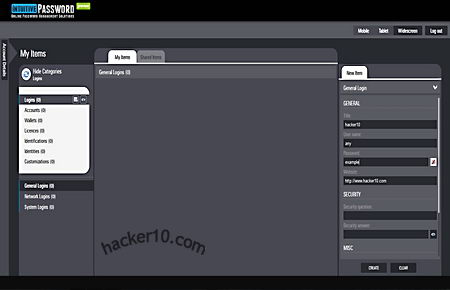
The password manager has an easy to navigate clean lay out, with a single click you can switch from a wide screen desktop view to tablet or smartphone view,  it will work with any operating system and nearly all smartphones, data is synchronized on the cloud without the need to download any application.

There are pre-made templates to store credit card and bank details, the fields include input boxes specific to the data, like Swift code and expiration date, if you need a particular box Intuitive Password lets you create your own template and customize all fields, passwords can be shared in between colleagues accessing a “Shared Items” tab from where securely send secret passwords and view those sent to you by other Intuitive Password users.

The only thing that disappointed me is that the main page said it was compatible with the Opera browser but I could not manage to make it work with Opera and I had to switch to Firefox instead, overall, assuming server security is as good as they say, this could be a good alternative to more established online password manager services, Intuitive Password had one of the best user interfaces I have seen, it should help boost productive time.

Note: Service is in Customer Technology Preview stage.

Visit Intuitive Password homepage


Post self-destructing Twitter messages with Efemr

$
0
0

Efemr is a free web and mobile app to post time limited messages on Twitter, it works by adding a timestamp hashtag at the end of your message, for example adding #8m at the end of a post would erase your Twitter message in eight minutes, time can be set to a few hours too but no more than that. The app backups all messages keepimng a private list of deleted posts next to a retweet button in case you change your mind and to remember you what you have posted in the past even if it is no longer visible.

Efemr self-destructing Twitter messages

Efemr self-destructing Twitter messages

Being able to limit how long for something will remain on the Internet it is a step in the right direction to protect people’s privacy but it will not replace common sense, there is still the possibility of someone taking a screenshot of the Tweet, the time frame is not perfect either, Twitter feeds take longer than the specified limit to be erased and anyone could copy and paste or retweet your message, if you truly want to keep your Tweets private then encrypt them with AnonTwi  or any text encryption utility and make them only available to people you know, if anyone takes a screenshot it will only show cihphered text.

Another way to achieve Twitter privacy is by never using your real name when opening an account, never post personal identifying data when posting and always use Tor or a VPN to log into Twitter.

Visit Efemr homepage

Encrypted Disk Detector for live computer forensics

$
0
0

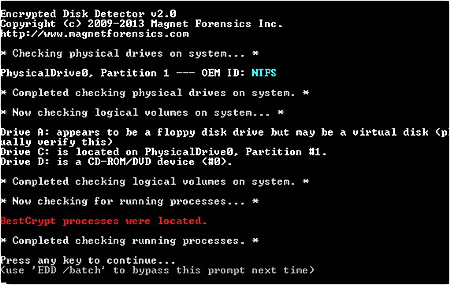
Encrypted Disk Detector is a free Windows command line tool for computer forensics that can detect Truecrypt, PGP, Bitlocker, Safeboot, Sophos Safeguard, Endpoint Security FDE, Symantec Endpoint FDE and Bestcrypt encrypted volumes. The software checks for encryption signatures in the Master Boot Record and Volume Boot Records, where encryption tools store the authentication hashing mechanism that decrypt data, it also displays OEM ID and volume label partition where applicable, when the encryption software hasn’t got any identifiable signature Encrypted Disk Detector scans for running processes indicative of disk encryption.

This tool is useful to incident response practitioners to quickly determine if encryption is being used in any of the company or network computers before deciding what steps to take next, e.g. mirror drives, prior to pulling the plug. Encrypted Disk Detector runs in read mode and does not make any file changes, its intuitive coloured notification arrangement makes it effortless to interpret the results.

Encrypted Disk Detector finds BestCrypt volume

Encrypted Disk Detector finds BestCrypt volume

Encrypted Disk Detector is not a threat to home users, the software does not attempt to guess what drives are encrypted, it only checks for volumes that are already mounted on live systems, it will not detect encryption in unmounted disks, TCHunt is more appropriate for that task, this is a time saving tool that can be deployed in a matter of seconds in a large network.

Visit Encrypted Disk Detector homepage

Learn cyberwar skills online playing CTF365

$
0
0

Capture The Flag CTF365 is a realistic cyberwar game built for hackers, system administrators, security specialists, programmers and anyone with an interest in computer security

After signing up for the game you will be named a Combatant and asked to join the country you wish to fight for, each country can have many teams comprised of in between a minimum of five hackers and no more than ten. Teams can ally with each other to defend and attack a Fortress, members of the hacking team will have to safeguard their server while being on the offensive, when a user breaches another team Fortress the points go to the whole team. There will be a Hall of Fame with prizes for the most skilled hackers.

In this Capture The Flag contest the team’s server will run all major Internet services like SMTP, IMAP, FTP, one Content Management System with plugins for social media, embedded video and others, two different Internet browsers, three web applications and two different databases, part of your job will be to secure all of them.

Hacking game Capture The Flag CTF365

Hacking game Capture The Flag CTF365

The game first campaign will mimic a National Agency network where you can play offensive security attacking their servers, as part of the attack strategy, you can DDoS another players virtual servers if you wish so, just like in real life. There is a CTF365 IRC server accessible from within the game, you can use it to find other players and start building your team or join others. There are only two rules, one, do not use the infrastructure to carry out real hacking attacks against non players, and rule two is do not launch a distributed denial of service against the game servers, if you break any of those rules your account might be terminated.

Capture The Flag is a superb way to get real hands on experience for penetration testers and sys admins defending their network, anyone with interest in computer security will benefit of this game emulating real life hacking scenarios, the aim is to have hundreds of targets in virtual machines that can be attacked at any time and for Capture The Flag to last a full year, there are future plans to offer Infosec companies the possibility to set up their own CTF contest to train students.

Note: You can get early access to the game referring five friends.

Visit Capture The Flag CTF365

Android encrypted data backup with truBackup

$
0
0

truBackup is an Android app to backup an restore data,  it allows you to select the files you wish to copy, like contacts, SMS, applications, or media files with photos and videos. Data can be backed up to internal or external storage (SD card) or to the cloud in your DropBox account, truBackup main interface is clear and simple to use, with only four buttons to tap on its main window: “Backup” ; “Restore” ; “Schedules” ; “My Devices“.

When you first run the app it will ask you where you would like to store the data and shown backup progress when you tap the “Show Status” bar at the bottom of the screen, you can schedule backups daily, weekly or monthly at an specified time and never have to remember again backing up your data, if you are backing up online to Dropbox, to avoid huge mobile phone bills choose the option “Wi-fi only” inside the settings.

truBackup Android encrypted backup

truBackup Android encrypted backup

All data is encrypted with AES256, the app can do incremental backups, saving you time by only copying those files that have changed since the last backup, logs and reports show you what has been copied and how much space you are using, what I liked most of this app was its simple interface and being able to encrypt data prior to copying it, there are more complete Android data backup apps with built-in encryption like Titanium Backup but it is considerably more expensive.

If you want to encrypt and back up your Android data for free you could use Wuala, but it will only work online linked to a Wuala account.

Note: truBackup currently costs $2.99

Visit TruBackup homepage

Self-erasing chat conversations with OTR browser extension

$
0
0

Off The Record messaging is a browser addon for Chrome (Firefox and Internet Explorer coming soon), to automatically erase messages you send to your friends or co-workers after they have been viewed. When someone receives or views a photo sent with OTR they have five seconds before it self-destructs, this default setting can be changed to a longer period of time if you wish so. You have to register your email address and a password to install the plugin, then you will see a bright OTR button on the top right corner of the browser, you need to add contacts or send invites by email before you can communicate, only other OTR users in your contact list and with he same plugin installed will be able to read the messages.

A small window opens when you click on the OTR button, big enough to write a few hundred words, photos can not be attached, they have to be taken with the computer camera.

Off The Record browser plugin self-erasing messages

Off The Record browser plugin self-erasing messages

This is a very basic plugin in features and security, not suitable for high privacy, anyone can take a screenshot or photo of the message and preserve it, it will only be of real benefit to avoid exposing personal messages by accident by keeping them off email services that archive all conversations, e.g. Gmail. Off The Record browser plugin target public are company workers who don’t want the boss to learn what they are gossiping about in the office, it could do the trick for that purpose, but it will not keep a very determined boss or IT administrator from learning what messages are being exchanged, a packet sniffer is all someone would need to spy on you since there is no mention of encryption anywhere in OTR specifications.

You should not confuse this plugin with the excellent Pidgin OTR plugin for Instant Messenger, they both have the same name but are very different.

Visit Off-The-Record homepage

Viewing all 193 articles
Browse latest View live